


I
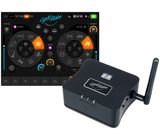
Perfect little box
An absolutely perfect little box — you just need to know how to use it. Unfortunately, even the manufacturer doesn’t seem to know this, as I found out through their support.
I’m running it with a Samsung A8 tablet (probably one of the worst tablets ever made for MIDI and music work).
Connection:
If you are connected directly to the LR512, you need to disable automatic network switching/login; otherwise, frequent dropouts occur. Once this is disabled, the connection is stable.
MIDI:
My light show is fully pre-programmed in my keyboards, which also send a sync clock to the drummer’s metronome, handle tempo synchronization for various instruments, and switch presets.
If you want Light Rider to respond to MIDI commands, the note velocity must be set to 127 — otherwise there is no response. Light Rider also accepts MIDI only on channel 1. If you send MIDI notes or CC messages from any other channel, it freezes and disconnects from the LR512.
For this reason, a MIDI filter is required. An ideal solution is, for example, the CME H4MIDI, where you can force the velocity to 127 and remap channels so that all lighting commands are always sent on channel 1.
The simulation connection using Easy View Connect with Sushi works perfectly, so I don’t have to set up the entire lighting rig.
I’m taking a star off because none of these important details are mentioned in the manual, and even the support team was unaware of them.
I’m running it with a Samsung A8 tablet (probably one of the worst tablets ever made for MIDI and music work).
Connection:
If you are connected directly to the LR512, you need to disable automatic network switching/login; otherwise, frequent dropouts occur. Once this is disabled, the connection is stable.
MIDI:
My light show is fully pre-programmed in my keyboards, which also send a sync clock to the drummer’s metronome, handle tempo synchronization for various instruments, and switch presets.
If you want Light Rider to respond to MIDI commands, the note velocity must be set to 127 — otherwise there is no response. Light Rider also accepts MIDI only on channel 1. If you send MIDI notes or CC messages from any other channel, it freezes and disconnects from the LR512.
For this reason, a MIDI filter is required. An ideal solution is, for example, the CME H4MIDI, where you can force the velocity to 127 and remap channels so that all lighting commands are always sent on channel 1.
The simulation connection using Easy View Connect with Sushi works perfectly, so I don’t have to set up the entire lighting rig.
I’m taking a star off because none of these important details are mentioned in the manual, and even the support team was unaware of them.
0
0
Ohlásit hodnocení
D-
Výpadky Wifi
Pořád vypadává spojení iPad - Light Rider , i když měním Channel 1-12
1
0
Ohlásit hodnocení